Make a whole card clickable with one stretched link
Don’t wrap a card in an <a> to make it clickable. Stretch the title link over it with ::after, and screen readers announce just the title.
This is based on Heydon Pickering’s  Cards chapter of Inclusive Components:
<ul class="cards" role="list">
  <li class="card">
    <h3>
      <a href="/trips/lisbon/">Lisbon</a>
    </h3>
    <p>4 nights, from $620</p>
    <img src="lisbon.jpg" alt="" />
  </li>
</ul>
.cards {
list-style: none;
padding: 0;
}
.card {
position: relative;
display: flex;
flex-direction: column;
}
/* Shown first, read after the heading */
.card img {
order: -1;
}
.card h3 a::after {
content: "";
position: absolute;
inset: 0;
}
.card:has(h3 a:focus-visible) {
outline: 2px solid;
outline-offset: 3px;
}
.card h3 a:focus-visible {
outline: none;
}The heading comes before the image in the source. If the image came first and had alt text, people jumping between headings would skip it. Here it’s decorative, so its alt is empty.
The cards are in a list so screen readers announce how many there are, like “list, 3 items”. Safari stops treating a list as a list once list-style: none hides its bullets, so role="list" puts that back.
Positioned elements without a z-index paint in source order, so anything positioned after the title link covers the overlay. Use that for other links in the card, like an author name: position: relative lifts them above it, and one before the title link also needs a z-index. It can also catch you out. On the homepage, the screenshot’s image is positioned and comes after the heading, so the screenshot needs pointer-events: none to let clicks through.
The overlay also covers the card’s text, so it can’t be selected. If that matters, Heydon’s chapter has a JavaScript version that forwards clicks on the card to the link and keeps the text selectable.
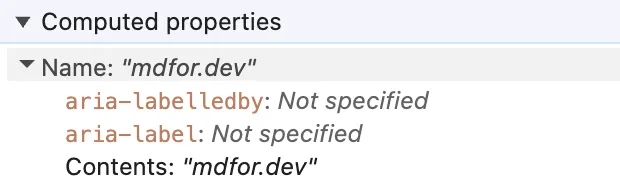
The project cards on the homepage used to be wrapped in an <a>. Chrome’s accessibility panel showed the link’s name as everything in the card, too long to fit:
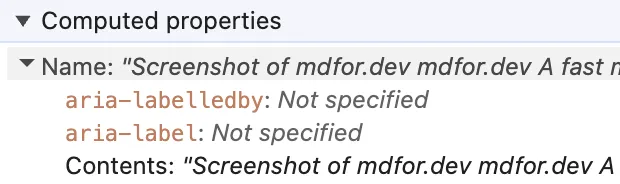
An empty alt alone wouldn’t fix it. Most of that name is the card’s description, and any text inside the <a> ends up in the name.
With the stretched link, the name is just the project name: