I Set the Spinner Before the Work. Why Doesn't It Show?
Picture a frontend interview. The interviewer shares a button handler:
button.addEventListener("click", () => {
  spinner.hidden = false;
  processRows(rows); // About 2 seconds of synchronous work.
  spinner.hidden = true;
});
Users click, the page freezes for two seconds, and the spinner never shows. Why?
Here’s that handler, with a second of work instead of two:
Interactive demo: buttons that run the spinner handler (Synchronous) with about a second of real work. Try it on the page.
Click it and watch for the spinner.
The first answer comes fast: “JavaScript blocks rendering. The browser only paints after the handler returns.” That’s right. By the time the browser gets to paint, the spinner is hidden again, so there’s nothing to show. If tasks, frames, and paint are fuzzy, How the Browser Draws a Frame walks through them first.
You may never have shipped this exact bug. If your spinners wrap a fetch, the handler returns at the await, and the browser paints while the request is in flight. But you’ve probably seen the same problem in other forms: a setTimeout(fn, 0) that made something work and nobody knew why, or a poor  Interaction to Next Paint (INP) score traced back to a click handler. They come down to the same question as the spinner: when does the browser get a turn to paint?
The fix is to give the browser that turn before the work starts. Every follow-up below is a different way to try that, and only some of them work.
Question 1: Force a Reflow?#
Read the spinner’s size right after showing it. That makes the browser update the page.
button.addEventListener("click", () => {
  spinner.hidden = false;
  spinner.offsetHeight; // Forces style and layout now.
  processRows(rows);
  spinner.hidden = true;
});
Interactive demo: buttons that run the spinner handler (Forced reflow) with about a second of real work. Try it on the page.
Click it and watch for the spinner.
Still no spinner. To give you a correct number, the browser has to work out the page’s styles and layout right away. This is called a forced reflow. But working out where things go isn’t drawing them. Painting is a later step, and the browser still won’t do it until your handler returns. The forced reflow section of How the Browser Draws a Frame has a diagram of both: the read pulls layout into your task, and paint still waits for the frame.
Question 2: Just Await Something?#
Put an
awaitbefore the work. Then the handler returns and the browser can paint.
button.addEventListener("click", async () => {
  spinner.hidden = false;
  await Promise.resolve();
  processRows(rows);
  spinner.hidden = true;
});
Interactive demo: buttons that run the spinner handler (await Promise.resolve()) with about a second of real work. Try it on the page.
Click it and watch for the spinner.
No spinner either. The handler does return at the await, but the rest of the function is queued as a microtask, and microtasks run as soon as the current task’s script finishes, before the event loop moves on. In the HTML spec, rendering is a task of its own, so it can only run after that. So the work runs, the spinner hides, and only then does the browser get to paint. The event loop diagram in How the Browser Draws a Frame shows that order: a task, then all its microtasks, and only then can the browser pick rendering.
The problem isn’t await. It’s awaiting something that’s already resolved. That’s why await fetch(...) works: the response arrives in a later task. await Promise.resolve() and queueMicrotask() never leave the current task.
await Promise.resolve()never painted
await fetch(url)painted while waiting
Question 3: Then a setTimeout?#
Fine. What about
setTimeout(fn, 0)?
button.addEventListener("click", () => {
  spinner.hidden = false;
  setTimeout(() => {
    processRows(rows);
    spinner.hidden = true;
  }, 0);
});
Interactive demo: buttons that run the spinner handler (setTimeout(0)) with about a second of real work. Try it on the page.
Click it and watch for the spinner.
Click the button. There it is, finally. The handler finishes, the timer callback is a new task, and the browser can render between two tasks.
The interviewer nods, then changes one thing. Not all work starts with a click. A dashboard might also refresh its table on its own, every minute. The code stays; only what starts it changes:
Put that code in a function. Call it from the click, and also from a
setInterval. Does the spinner show both times?
function refreshTable() {
  spinner.hidden = false;
  setTimeout(() => {
    processRows(rows);
    spinner.hidden = true;
  }, 0);
}

button.addEventListener("click", refreshTable);
setInterval(refreshTable, 60_000);
Interactive demo: buttons that run the spinner handler (setTimeout(0), from a timer) with about a second of real work. Try it on the page.
Click it and watch for the spinner.
No. Try the button above: no spinner. In Chrome, the click version painted the spinner every time I tried it. The timer version never did.
Can render isn’t will render. The browser gets a rendering opportunity about once per display frame, and the spec lets it pick which task runs next. It even says a browser “might wish to coalesce timer callbacks together, with no intermediate rendering updates”. A zero timeout is ready long before the next frame, so nothing says the render goes first.
The click is the difference. After a click or a key press, Chrome  holds back other tasks for up to 50 ms so the next frame can paint. A timer isn’t input, so the zero timeout runs right away and the frame waits behind the work.
So setTimeout gives the browser a turn. It doesn’t say what the browser does with that turn. To be sure the spinner paints, you need something tied to frames.
Question 4: requestAnimationFrame, Then?#
requestAnimationFrameruns right before a paint. Start the work there.
button.addEventListener("click", () => {
  spinner.hidden = false;
  requestAnimationFrame(() => {
    processRows(rows);
    spinner.hidden = true;
  });
});
No spinner again. Right before is the problem: requestAnimationFrame callbacks run as part of the frame, before style, layout, and paint. The work runs inside that frame, the spinner hides, and then the frame paints the hidden spinner.
That’s why the double requestAnimationFrame trick exists:
spinner.hidden = false;
requestAnimationFrame(() => {
  // This frame paints the spinner.
  requestAnimationFrame(() => {
    // We're in the next frame, so the first one has painted.
    processRows(rows);
    spinner.hidden = true;
  });
});
Interactive demo: buttons that run the spinner handler (requestAnimationFrame, Double rAF) with about a second of real work. Try it on the page.
Click a button and watch for the spinner.
The inner callback goes to the next frame, so the first frame paints with the spinner on screen. This one held: it painted the spinner every time, from the click and from the interval. It costs up to two frames before the work starts, and the work still freezes the second frame.
Question 5: Prove the Spinner Painted#
How do you know the spinner showed? Maybe it painted for one frame and nobody saw it.
Record it. In Chrome’s Performance panel, turn on Screenshots, click Record, click the button, and click Stop. Then zoom in to where the long task starts.
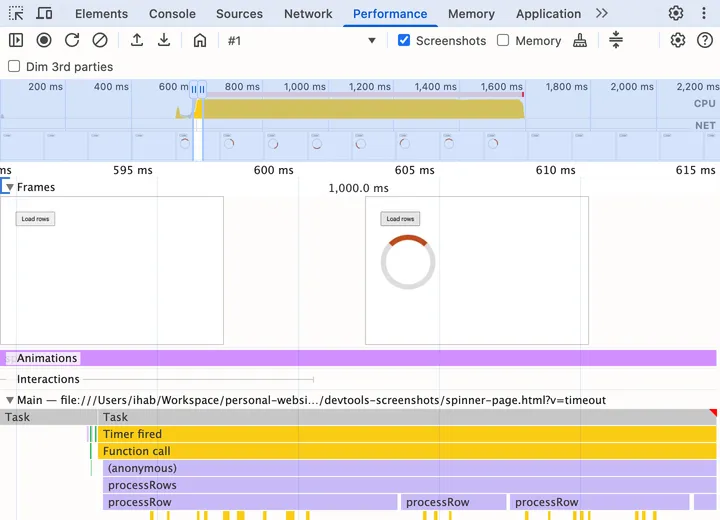
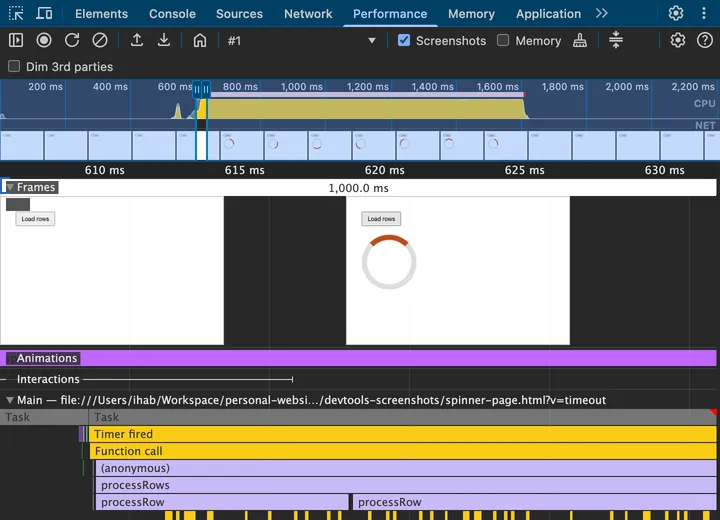
- Main track: the long task has a
 red corner. Right before it, thin purple and green marks are the frame being rendered and painted. In the one-task version, nothing comes between the click and the work.
- Frames track: the screenshots show what was actually on screen. The one before the long task has no spinner; the ones after it do.
The Debrief#
The first answer was “JavaScript blocks rendering.” The follow-ups were about when the browser gets to render:
| Fix | Spinner shows? | Why |
|---|---|---|
| Synchronous | No | The browser only paints after the task |
| Forced reflow | No | Style and layout run, but paint still waits |
Microtask (await) |
No | Microtasks run before rendering |
setTimeout, after a click |
Yes | The browser chose to render first |
setTimeout, from a timer |
No | The timer ran before the next frame |
| One rAF | No | rAF runs before the paint of its frame |
| Double rAF | Yes | The work waits for the next frame |
- Painting happens between tasks, never during one. Microtasks don’t count as “between”.
- A new task is a chance to render, not a promise. After input, the browser favors the frame; from a timer, it may not.
requestAnimationFrameis for work that should be in the next frame, not after it.- The Performance panel shows which frames painted. Check there instead of guessing.
The spinner shows now. But look at the table again: every fix still runs the work as one two-second task. The page can’t scroll, and if you added a Cancel button, its click would wait until the work was done, with nothing left to cancel. That wait is input delay, and Part 4 of this series is about it.